Automation
AI automation for small businesses: the five workflows to start with, and what they cost
Automate these five first: instant reply and routing for new web leads, follow-up when a lead goes quiet, booking reminders, review requests after each job, and an email campaign to past customers. Flamcom builds the first two or three automations from $750, live in 1 to 2 weeks; past-customer campaigns start from $1,000. You pay your own tool subscriptions.
All prices are in US dollars, except n8n, which bills in euros.
Key takeaways
- Start with the steps between a new inquiry and a booked job: instant reply, follow-up on quiet leads and booking reminders.
- AI helps with messy text, such as sorting inquiries and drafting replies a person approves; timed steps such as reminders run better on plain rules.
- Tool plans start free or low: n8n self-hosted is free, and Make's Core plan is $12 a month (October 2, 2026).
- Flamcom builds two or three workflows from $750 in Python or n8n, and takes no commission on tools.
- Skip automation for now if the process is messy, volume is low or nobody owns the workflow.
What is AI automation for a small business?
AI automation for a small business is software that moves routine work along on its own, with an AI model handling the steps that involve reading or writing human language. A workflow is one chain of steps that starts from a trigger, such as a form submission, and ends in an outcome, such as a reply sent and a lead logged.
Many steps in a small business workflow need no AI. They run on plain rules: when X happens, do Y. Send the reminder a day before, or stop the follow-up when the customer answers. Rules are cheap and predictable, and anyone can read them.
AI workflow automation adds a model where a rule breaks down, such as a customer describing a leaking roof in three paragraphs. Our view is that a good setup is mostly rules, with a few AI steps that each do one narrow, testable job.
Which five workflows should a small business automate first?
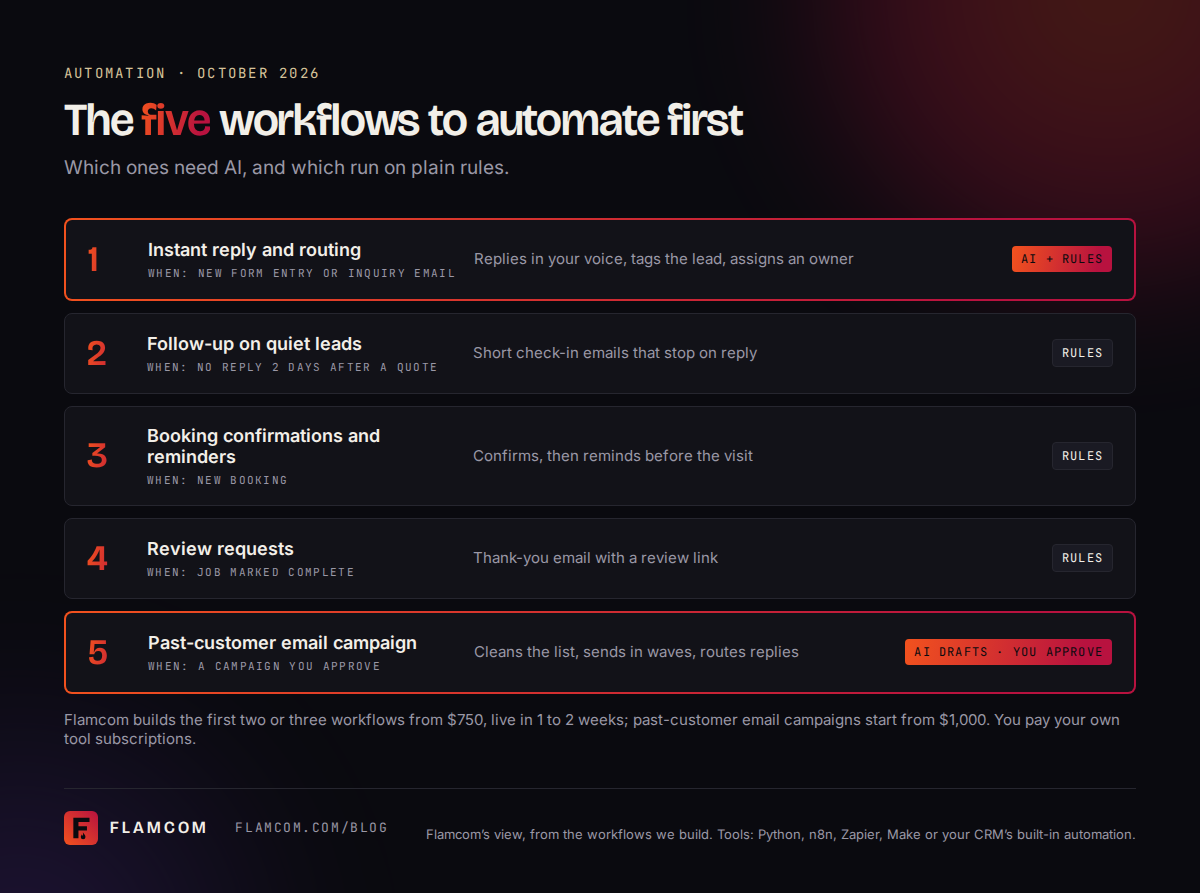
These five repeat every week and slip when the owner gets busy. Each one maps to work we build in our automation service.
Instant reply and routing for new web leads , logged in your customer relationship management (CRM) software, the place your contacts and deals live
Follow-up by email when a lead goes quiet , which stops the moment they answer
Booking confirmations and reminders by email
Review requests after the job. Reviews also feed AI answers; see how to rank in ChatGPT.
Reactivating past customers by email , a service we call database reactivation
The table below shows what each one does and what starts it.
Which workflows need AI, and which run on plain rules?
Only two of the five need AI at all, and only for reading or writing text. The table shows the trigger, the job, and where each workflow usually runs.
| Workflow | Trigger | What it does | AI or plain rules | Where it runs |
|---|---|---|---|---|
| Instant reply and routing | New form entry or inquiry email | Replies in your voice, tags the lead, assigns an owner | AI sorts free-text inquiries; rules send the reply and assign | Python or n8n; Zapier or Make for simple setups |
| Follow-up on quiet leads | No reply 2 days after a quote | Sends short check-in emails, stops on reply | Plain rules | CRM built-ins or n8n |
| Booking confirmations and reminders | New booking in your calendar or booking tool | Confirms, then reminds before the visit | Plain rules | Booking tool or CRM built-ins, Zapier or Make |
| Review requests | Job marked complete | Emails a thank-you and a review link | Plain rules | CRM built-ins, n8n or Python |
| Past-customer email campaign | A campaign you approve | Cleans the list, sends emails in waves, routes replies | AI sorts the list and drafts; you approve every email | Python or n8n with a sending tool in your name |
Flamcom's view is that two of the five first workflows for a small business need AI, to sort new inquiries and draft past-customer emails; rules run the rest.
Where does AI actually help, and where is a plain rule better?
AI earns its place where a person would otherwise read and retype: sorting free-text inquiries, pulling details out of long emails, summarizing threads and drafting replies for someone to approve (how we use AI in automation).
A plain rule is better wherever the step must happen the same way each time: reminder timing, tagging by form, stopping a sequence on reply, routing by ZIP code. Review requests belong here too. Google's Maps content policy bars businesses from selectively asking only happy customers for reviews and from offering incentives for reviews, so the rule should send the same request after every finished job.
A person signs off on anything that commits the business: prices, quotes, refunds, complaint replies and promised dates. AI can draft those. In our builds it does not send them.
What does small business automation cost to run?
The running cost is mostly tool subscriptions, and many owners can start on a free or low tier. These are the lowest published plans on each vendor's pricing page on October 2, 2026.
| Tool | Free option | Lowest paid plan (October 2, 2026) | What the paid plan includes |
|---|---|---|---|
| n8n | Community Edition, free to self-host | Starter: €20 a month billed annually, €24 billed monthly | 2,500 workflow executions a month |
| Zapier | Free plan, 100 tasks a month | Professional: from $19.99 a month billed annually | 750 tasks a month, multi-step Zaps |
| Make | Free plan, up to 1,000 credits a month | Core: $12 a month billed monthly | 10,000 credits a month |
| Custom Python script | No tool subscription | Server cost, listed in your written scope | No per-task fee |
| CRM built-in automation | Depends on your CRM | Part of your CRM plan, where included | Set by your CRM's plan |
The three platforms count usage differently. Zapier bills by tasks, Make by credits, and n8n by workflow executions, which its pricing page says include unlimited steps. Compare plans on the number of runs you expect each month, then check what counts as one run. Self-hosting n8n removes the subscription, but someone has to run and update the server.
An AI step adds a usage fee from the AI provider. We list that, and any other running cost, in your written scope before you agree.
What does Flamcom charge to build it?
Flamcom builds the first two or three workflows from $750, in custom Python or n8n, and they are typically live within 1 to 2 weeks. Each workflow has logging, automatic retries and failure alerts. We map how your leads move today, then send a written scope with a fixed price, and larger builds are quoted there.
Tool accounts sit in your name and on your bill, and we take no referral or affiliate commission. If your own team will build, we can quote the process map and recommendations alone. We don't send text messages or make phone calls. Our workflows run through your email, CRM and calendar, and a link into an older system becomes a custom development project.
A database reactivation campaign to past customers starts from $1,000, for US and Canadian contacts. It covers list cleaning, a consent check, SPF, DKIM and DMARC setup (email records that prove a message comes from your domain) and a 3-email campaign.
Flamcom charges from $750 to build a small business's first two or three automations; the client pays the n8n, Zapier, Make or CRM subscription directly.
When should a small business not automate yet?
Hold off in three cases, and fix the cause first.
- The process is messy. If two people handle the same inquiry in two different ways, a workflow will copy the confusion at speed. Agree the steps on paper first.
- Volume is low. With a few inquiries a month, a saved email template and a calendar reminder may cover it.
- Nobody owns it. Each workflow needs one named person who reads the failure alerts, approves drafts and updates the wording when prices change.
A weak contact form is a fourth blocker. If few people fill it in, a workflow has little to act on, so fix the form first with conversion work.
Flamcom advises small businesses to wait on automation when the process is unclear, inquiries are rare, or no named person will own the workflow.
How can you start automating in a week?
You can have one workflow live in a week if you pick a narrow one and keep the first version plain.
Day 1: Map one inquiry. List each step from form to booked job, who does it and where it stalls.
Day 2: Pick one workflow. For most businesses that is the instant reply to new web leads.
Day 3: Check your tools. Look for built-in automation in your CRM or booking tool first.
Day 4: Write the messages. Draft them in your own words and mark which ones a person must approve.
Day 5: Build it plainly. Use rules for every step, and add AI only if the inquiries are free text.
Day 6: Test it. Send test leads through, including a duplicate and an unsubscribe.
Day 7: Name the owner. Agree who reads the alerts, then switch it on and review the first 20 runs by hand.
Questions owners ask about small business automation
What should a small business automate first?
Automate the instant reply to new web leads first. It runs on every inquiry, it is quick to build, and a fast reply gives the lead less reason to call someone else. Follow-up on quiet leads and booking reminders come next. With years of past customers on file, an email campaign to them can go first.
How much does AI automation cost for a small business?
There are two costs: the build and the tools. Flamcom builds two or three workflows from $750. Tool plans start low: as of October 2, 2026, Make's Core plan costs $12 a month, Zapier's Professional plan starts at $19.99 a month billed annually, and n8n's Community Edition is free to self-host. Our pricing page lists every published Flamcom price.
Is Zapier, Make or n8n better for a small business?
Each suits a different need. Zapier and Make are no-code tools for simple links between popular apps, and both have free plans to try. n8n can be self-hosted for free and counts a whole workflow run as one execution, which helps with long workflows. We prefer custom Python or n8n for client work, and use Zapier, Make or your CRM's built-ins where they fit better.
Can AI reply to my customers without anyone checking?
It can for routine messages you have already approved as templates, such as a booking confirmation or a reminder. For anything that commits the business, such as a price, a quote, a refund or a complaint reply, we set AI to draft the message and queue it for a person to approve or edit.
Do I need a CRM before I automate?
No, though a CRM helps. A first workflow can run from your inbox, a calendar and a spreadsheet. Once leads arrive tagged and assigned, you will want one place to see them, and that is the time to add a CRM. For a past-customer campaign, we merge your exports into one clean list, as our database reactivation page explains.
Can you automate text message reminders?
Flamcom doesn't send text messages, so text reminders are outside our scope. Many booking and calendar tools include text reminders of their own, and those can run beside an email reminder we set up. If text is your main channel, check what your booking tool offers before paying for a separate platform.
Find out which workflows to build first
Start with one workflow that runs every week, keep the rules plain, and use AI only where people write in their own words. Send us the tools you use and where your leads go quiet. Within one business day (Monday to Friday) you get your free assessment by email, and after it a written scope with a fixed price.
Have years of old customers in a spreadsheet? Ask about a past-customer campaign.
If you send your website address, your free assessment includes:
- A phone speed check with Core Web Vitals (Google's speed and stability scores)
- The pages people in your market search for that your site lacks
- A check on whether AI assistants name your business today
Sources
- n8n: Plans and Pricing, accessed 2026-10-02
- Zapier: Plans and Pricing, accessed 2026-10-02
- Zapier: Zapier pricing, why Zapier is a better value for automation, accessed 2026-10-02
- Make: Pricing and Subscription Packages, accessed 2026-10-02
- Google: Maps User Generated Content Policy, Prohibited and restricted content, accessed 2026-10-02
More from the blog